Chat with Your Recaps
Ask questions about any meeting and get instant answers. Find specific moments, extract insights, and never lose important details again.
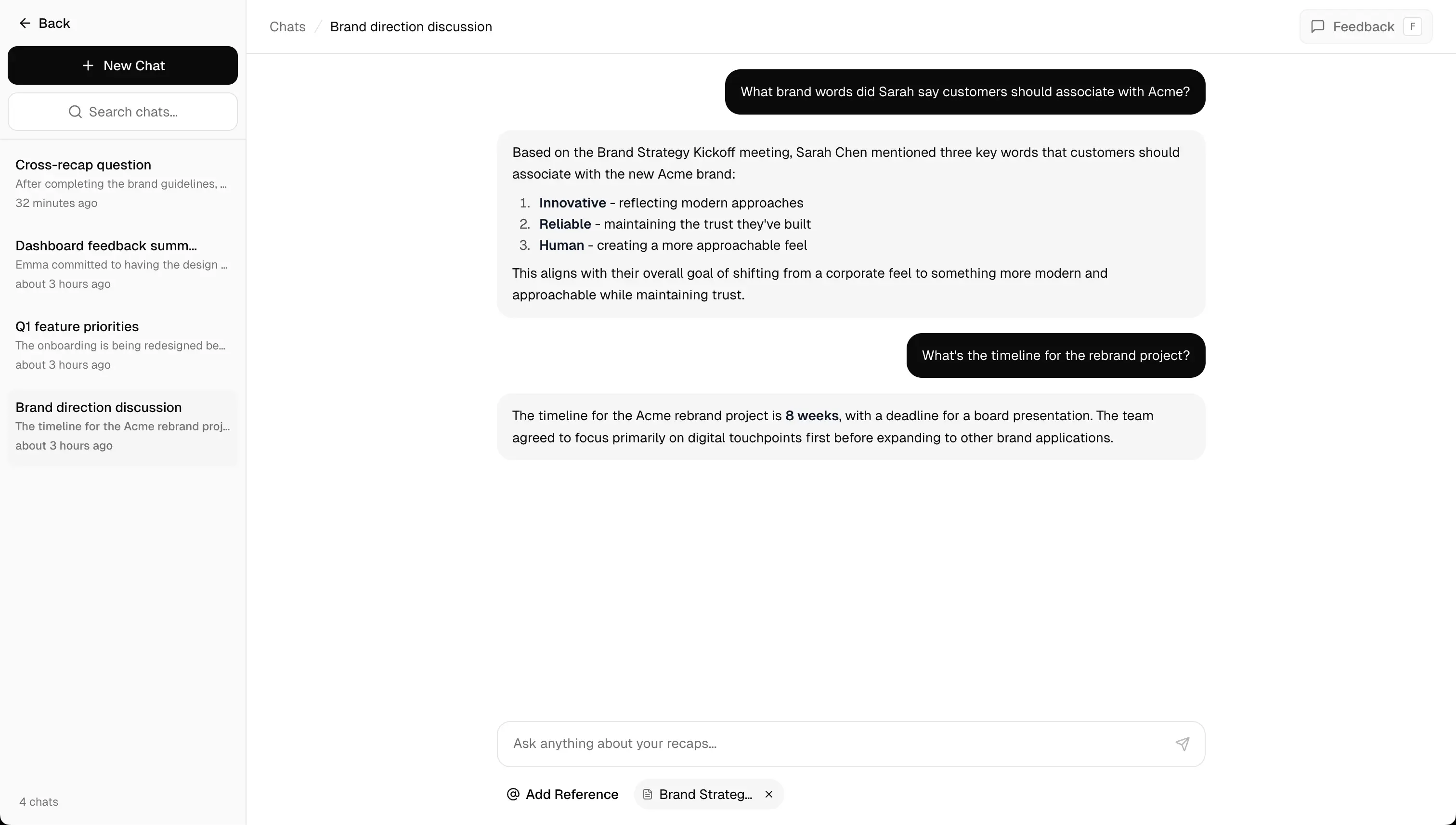
Ask anything about your meetings
Your AI assistant understands the full context of every conversation.
Find Specific Moments
Ask 'When did we discuss the budget?' and jump directly to that part of the meeting.
Extract Action Items
Ask for all tasks mentioned, who's responsible, and their deadlines.
Understand Decisions
Get clarity on what was decided, by whom, and the reasoning behind it.
Summarize Topics
Request a summary of any specific topic discussed in the meeting.
How it works
Start chatting with your meetings in minutes.
Record or upload
Capture your meeting or upload an existing recording. Recal processes it automatically.
Open the chat
Click the chat icon on any recap to start a conversation with your AI assistant.
Ask questions
Type natural questions like you would ask a colleague who attended the meeting.
Get instant answers
Receive accurate answers with references to specific moments in the recording.
Everything you need to unlock better insights
Powerful features designed to make your meetings more valuable.
Multiple Chat Threads
Create separate conversations for different topics. Keep your budget discussion separate from your timeline chat.
Instant Responses
Get answers in seconds, not minutes. AI processes your entire meeting to provide accurate, contextual responses.
Precise Citations
Every answer includes timestamps. Click to jump directly to the relevant moment in your recording.
Smart Suggestions
AI suggests relevant questions based on your meeting content. Discover insights you might have missed.
Full History
Access all your past conversations. Pick up where you left off or review previous insights anytime.
Natural Language
No special commands needed. Ask questions the way you naturally would — AI understands context and intent.
Use cases
See how teams use chat to get more from their meetings.
Missed a meeting?
Ask AI to catch you up on the key points instead of watching the entire recording. Get a personalized summary based on your role.
"What decisions were made about the Q2 roadmap?"
Preparing a follow-up
Quickly gather all action items, deadlines, and responsible parties to create accurate follow-up communication.
"List all action items assigned to the design team"
Resolving disputes
Find the exact moment when something was discussed or decided. Get definitive answers with timestamp evidence.
"When did we agree on the final pricing?"
Onboarding teammates
Help new team members get up to speed by letting them ask questions about historical meetings and decisions.
"What was the original reasoning behind feature X?"
Related features
Explore more ways Recal helps you get value from meetings.
Simple, transparent pricing
Start free, upgrade when you're ready. No hidden fees, cancel anytime.
What's included
- 30 min of async recaps per month
- Up to 3 async recaps per month
- AI summaries & tasks
- 3 Q&A questions per recap
- All integrations (Slack, Linear, Notion)
- 7-day retention
- Markdown export
Not included
- No meeting recaps
- No custom templates
- No team workspaces
What's included
- 5 hrs of meeting recaps/month
- 10 hrs of async recaps/month
- Up to 2 hrs per recap
- Up to 5 workspaces
- 3 team members per workspace
- Multiple recap templates
- 30 Q&A questions per recap
- All integrations
- 30-day retention
- Markdown & PDF export
What's included
- 15 hrs of meeting recaps/month
- 30 hrs of async recaps/month
- Up to 4 hrs per recap
- Unlimited workspaces
- 10 team members per workspace
- Custom recap templates
- 100 Q&A questions per recap
- All integrations
- 180-day retention
- Branded sharing
- Priority support
Have questions? Check our FAQ or contact us.
Chat with Recaps FAQ
Questions about chatting with your meeting recordings. Need more help? Reach out to us.
You can ask anything! Common questions include: finding specific moments ('When did we discuss the budget?'), extracting action items ('What tasks were assigned?'), understanding decisions ('What was decided about the timeline?'), and getting summaries of specific topics ('Summarize the marketing discussion').
The AI has access to the full transcript and video content of your meeting, so answers are highly accurate and include references to specific timestamps. You can click on any timestamp to verify the context directly in the recording.
Yes! You can create multiple chat threads per meeting. This is useful for separating different topics — for example, one chat for budget questions and another for timeline discussions. All your conversations are saved and accessible anytime.
Yes! Unlike other tools that only transcribe audio, Recal's AI actually sees and understands visual content including screen shares, presentations, and documents shown during the meeting. This context is included when answering your questions.
Responses typically arrive within 2-5 seconds. The AI processes your question against the full meeting context to provide accurate, comprehensive answers with relevant timestamps.
Absolutely! The chat maintains full conversation context, so you can ask follow-up questions naturally. The AI remembers what you've already discussed and provides relevant continuations.
Yes, all your chat conversations are saved and accessible from the recap page. You can return anytime to continue a conversation or review previous insights. Chat threads are organized by meeting for easy navigation.
Chat conversations are part of your recap, so when you share a recap with teammates, they can see the conversation history and continue asking questions. This makes it easy to collaborate on meeting follow-ups.
Still have questions?
We're here to help you get started.
Ready to chat with your meetings?
Start asking questions and get instant answers from any recording.