Transformez le chaos de Slack en clarté
Une commande pour analyser n'importe quel canal ou fil de discussion. Obtenez des résumés, des tâches et des décisions extraits automatiquement grâce à l'IA pour toute votre équipe.
Analyse Instantanée
Il suffit de taper /recal
Propulsé par l'IA
Résumés précis
Extraction de Tâches
Tâches automatiques
Team, we need to finalize the Q1 roadmap by Friday. @alex can you handle the API docs? @mike please review the design specs.
On it! I'll have the API docs ready by Thursday EOD. Need access to the staging env though 👀
#product-team Recap
Today • 3 messages analyzed
Summary
Team discussed finalizing Q1 roadmap with Friday deadline. Alex assigned to API docs, Mike to review design specs. Staging access needed.
Highlights
- • Q1 roadmap must be finalized by Friday (@sarah)
- • API docs deadline set for Thursday EOD (@alex)
Decisions
• Friday deadline confirmed for Q1 roadmap delivery (@sarah)
Action Items
- • Prepare API docs by Thursday → @alex
- • Review design specs → @mike
- • Grant staging env access → @sarah
Découvrez Recal en action
Captures d’écran réelles sur Slack montrant comment Recal transforme vos conversations.
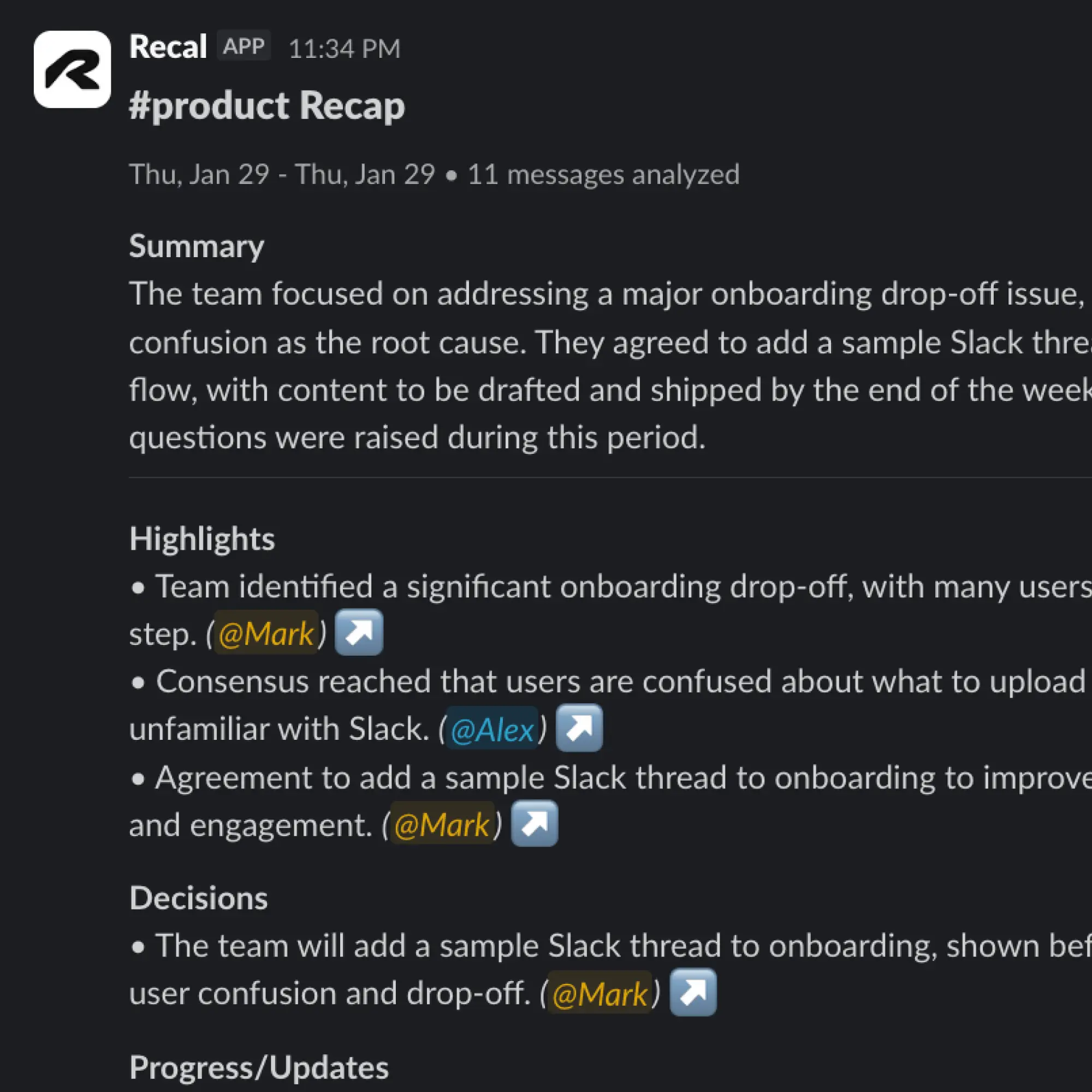
Récapitulatif structuré par l’IA
Recevez des résumés organisés avec décisions et actions extraites automatiquement.
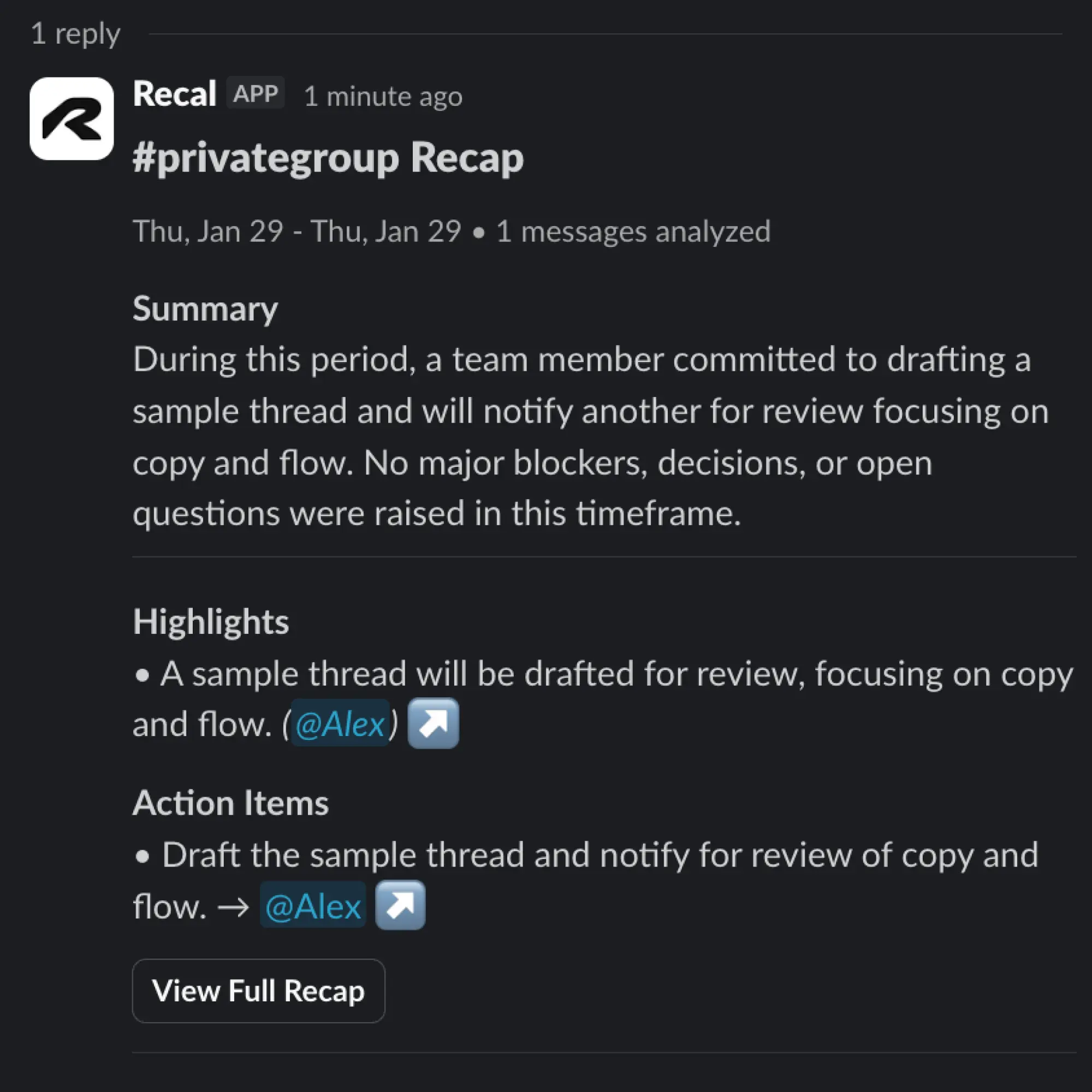
Analyse au niveau du fil
Analysez des fils spécifiques pour obtenir des résumés ciblés de discussions précises.
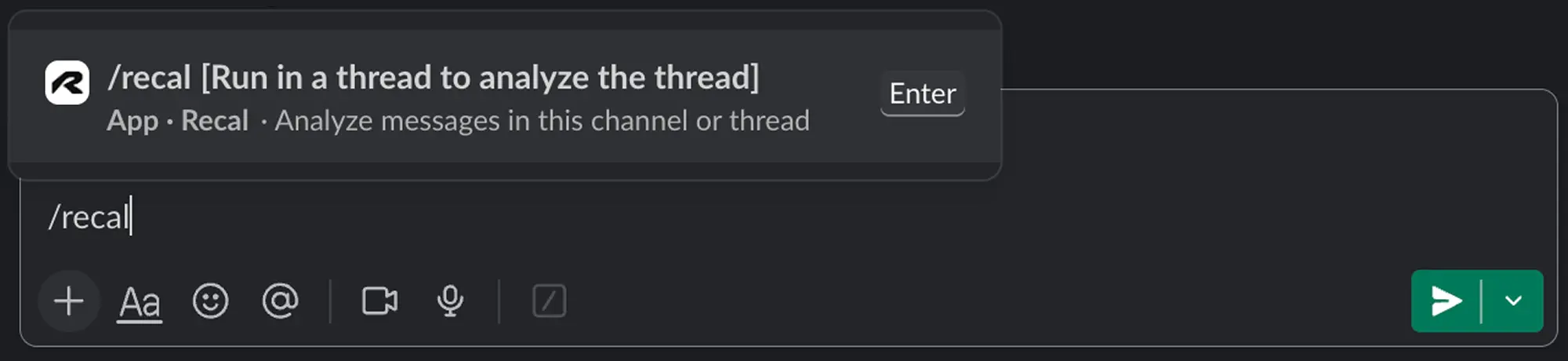
Une seule commande pour analyser
Tapez /recal dans n’importe quel canal pour analyser instantanément vos conversations.
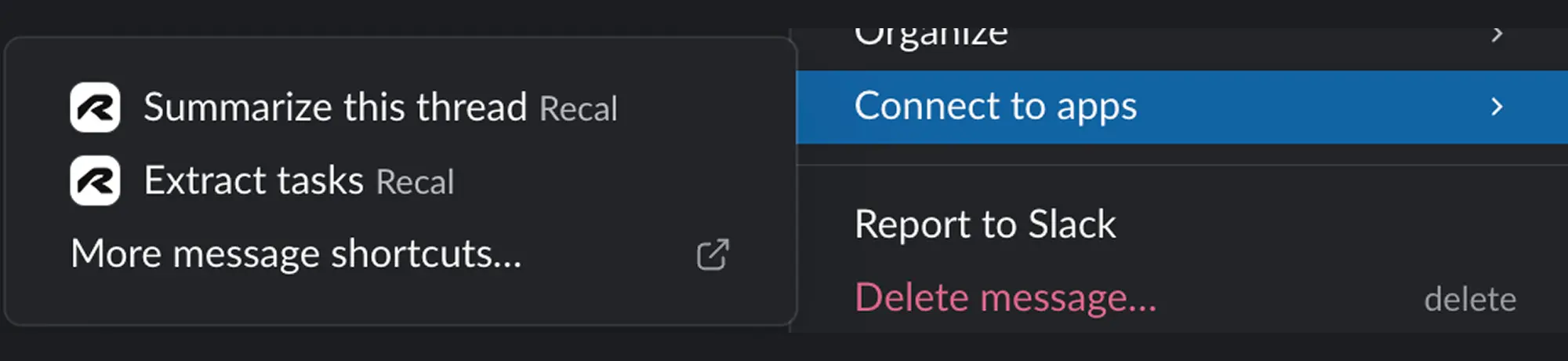
Raccourcis par clic droit
Utilisez les raccourcis de message pour résumer des fils ou extraire des tâches sans taper de commande.
Conçu pour les équipes modernes
Tout ce dont vous avez besoin pour garder votre équipe alignée et sur la bonne voie.
Analyse de Canal & Fil
Analysez des canaux entiers ou des fils spécifiques. Obtenez les 50 derniers messages de n'importe quel canal, ou chaque message dans un fil.
Informations Alimentées par l'IA
LLM extrait des résumés, décisions clés et contexte de vos conversations. Plus besoin de lire des messages interminables.
Tâches Automatiques
Les tâches, suivis et engagements sont automatiquement extraits avec les responsables et les dates d'échéance lorsqu'ils sont mentionnés.
Accès pour Toute l'Équipe
Installez une fois pour tout votre espace de travail. Chaque membre de l'équipe peut utiliser /recal dans n'importe quel canal auquel il a accès.
Confidentialité Avant Tout
Les résultats sont montrés uniquement à la personne qui exécute la commande. Partagez le lien seulement si vous voulez que d'autres voient.
Partage Facile
Obtenez un lien partageable vers l'analyse complète. Partagez avec des coéquipiers, des parties prenantes, ou conservez pour référence future.
Trois étapes vers la clarté
Des fils Slack chaotiques aux insights organisés en moins d'une minute.
Ajoutez à votre espace de travail
Cliquez sur 'Ajouter à Slack' et autorisez Recal pour votre espace de travail. Cela prend moins de 30 secondes.
Tapez /recal n'importe où
Dans n'importe quel canal ou fil de discussion, tapez simplement /recal. C'est tout. Recal analysera instantanément la conversation.
Obtenez des insights alimentés par l'IA
En quelques secondes, recevez un résumé, les décisions clés et les tâches à effectuer. Cliquez sur le lien pour l'analyse complète.
Exemples de commandes :
/recal— Analysez les 50 derniers messages dans le canal actuel/recal dans un fil — Analysez tous les messages de ce filEssai gratuit • Aucune carte de crédit requise
Choisissez votre superpouvoir Slack
Différentes équipes, différents besoins. Découvrez comment Recal transforme votre expérience Slack.
Résumés de fils
Fil de discussion long avec plus de 100 messages ? Obtenez les points clés, les décisions et les tâches à effectuer en quelques secondes. Évitez le défilement.
- Extraire les tâches des fils
- Décisions clés mises en évidence
- Résumés instantanés
Récapitulatifs automatisés
Résumés hebdomadaires ou quotidiens par IA livrés automatiquement. Commencez votre lundi pleinement informé de ce qui s'est passé.
- Plannings quotidiens à trimestriels
- Format structuré en 6 sections
- Aucun effort manuel
Assistant Personnel
Votre IA privée pour rattraper les canaux que vous avez manqués. Résultats visibles uniquement par vous — partagez seulement si vous le souhaitez.
- Privé par défaut
- Fonctionne dans tout espace de travail
- Mise à jour instantanée
Vous n'êtes pas sûr de ce qui convient le mieux ? Toutes les fonctionnalités fonctionnent avec une seule installation.
Explorez toutes les fonctionnalités Slack
Découvrez comment Recal aide les équipes à tirer parti des conversations Slack.
Récapitulatif Slack
Récapitulatifs de canal automatisés avec des résumés alimentés par l'IA
Résumé de fil
Résumés instantanés de tout fil Slack par l'IA
Résumé de canal
Obtenez les points forts de l'ensemble des canaux
Récapitulatif hebdomadaire
Résumés hebdomadaires de canal programmés
Récapitulatif quotidien
Résumé quotidien de l'activité du canal
Tâches à réaliser
Extraire des tâches des messages Slack
Résumé de huddle
Résumer les enregistrements de huddle Slack
Résumé de standup
Résumés IA des standups asynchrones
Tarification simple et transparente
Commencez gratuitement, passez à la version supérieure quand vous êtes prêt. Pas de frais cachés, annulez à tout moment.
Ce qui est inclus
- 30 min de récapitulatifs async/mois
- Jusqu'à 3 récapitulatifs async/mois
- Résumés et tâches par IA
- 3 questions de Q&R par récapitulatif
- Toutes les intégrations (Slack, Linear, Notion)
- Rétention de 7 jours
- Exportation Markdown
Non inclus
- Pas de résumés de réunions
- Pas de modèles personnalisés
- Pas d'espaces de travail d'équipe
Pro
Pour les professionnels qui veulent des résumés de réunions et la collaboration en équipe.
Ce qui est inclus
- 5 heures de résumés de réunions/mois
- 10 heures de récapitulatifs async/mois
- Jusqu'à 2 heures par résumé
- Jusqu'à 5 espaces de travail
- 3 membres d'équipe par espace
- Multiples modèles de résumés
- 30 questions de Q&R par récapitulatif
- Toutes les intégrations
- Rétention de 30 jours
- Exportation Markdown & PDF
Premium
Pour les utilisateurs avancés ayant besoin de réunions plus longues et de fonctionnalités avancées.
Ce qui est inclus
- 15 heures de résumés de réunions/mois
- 30 heures de récapitulatifs async/mois
- Jusqu'à 4 heures par résumé
- Espaces de travail illimités
- 10 membres d'équipe par espace
- Modèles de résumés personnalisés
- 100 questions de Q&R par récapitulatif
- Toutes les intégrations
- Rétention de 180 jours
- Partage avec marque
- Support prioritaire
Des questions ? Consultez notre FAQ ou contactez-nous.
Complétez votre flux de travail
Combinez l'analyse Slack avec d'autres outils Recal.
Réunions
Assistant de réunion alimenté par l'IA qui capture les transcriptions, les résumés et les tâches à réaliser.
Texte Collé
Transformez des messages désordonnés, des emails et des notes en tâches structurées.
Téléchargements
Traitez des fichiers audio et vidéo de n'importe où avec une analyse puissante par l'IA.
FAQ sur l'intégration Slack
Questions sur le bot Slack de Recal. Besoin de plus d'aide ? Contactez-nous.
L'installation est simple : cliquez sur 'Ajouter à Slack' sur notre site web, autorisez Recal pour votre espace de travail, et vous êtes prêt à partir. Aucun support IT nécessaire — la configuration prend moins de 60 secondes.
Recal n'accède qu'aux messages dans les canaux où vous invoquez explicitement la commande /recal. Nous ne lisons jamais les messages privés ni ne stockons votre historique complet de messages. Vos données restent privées et ne sont traitées que lorsque vous demandez un résumé.
Oui ! Le bot Recal peut résumer n'importe quel canal ou fil de discussion auquel il est invité, y compris les canaux privés. Pour les messages privés, vous pouvez utiliser notre mode personnel pour résumer les conversations auxquelles vous participez.
Recal peut résumer jusqu'à 500 messages en une seule demande. Pour les fils de discussion ou canaux plus longs, il se concentre intelligemment sur le contenu le plus pertinent et récent pour vous fournir des informations exploitables.
Oui, Recal fonctionne avec les canaux Slack Connect. Il suffit d'inviter le bot dans le canal partagé et d'utiliser /recal comme d'habitude. Votre équipe et vos partenaires externes peuvent bénéficier des résumés AI.
Chaque résumé inclut les points clés de la discussion, les décisions prises, les tâches avec les responsables, les délais mentionnés et les liens vers les messages importants. Vous pouvez personnaliser le format de sortie pour répondre aux besoins de votre équipe.
Les plans Pro et Premium incluent des résumés Slack illimités. Le plan Starter inclut 10 résumés par mois. Tous les résumés sont stockés dans votre tableau de bord Recal pour une référence facile.
Vous avez encore des questions ?
Nous sommes là pour vous aider à démarrer.
Prêt à apporter de la clarté à votre équipe ?
Rejoignez des centaines d'équipes utilisant Recal pour transformer le chaos de Slack en informations exploitables.